<?xml version="1.0" encoding="UTF-8" ?>
<feed xml:lang="ja" xmlns="http://www.w3.org/2005/Atom" xmlns:dc="http://purl.org/dc/elements/1.1/" xmlns:thr="http://purl.org/syndication/thread/1.0">
  <title type="text">おじい～PC入門</title>
  <subtitle type="html">PC確かに便利です、でも、ときどき機嫌を損ねます。
プログラムなど、うまい人のものを読むことが上達のコツだそうです。まずは、まねる事から。 参考になるWebを見つけ、読むこと。気に入ったWebサイトをメモしておきます。</subtitle>
  <link rel="self" type="application/atom+xml" href="http://samlen.blog.shinobi.jp/atom"/>
  <link rel="alternate" type="text/html" href="http://samlen.blog.shinobi.jp/"/>
  <updated>2007-04-13T22:42:53+09:00</updated>
  <author><name>H.kino</name></author>
  <generator uri="//www.ninja.co.jp/blog/" version="0.9">忍者ブログ</generator>
  <atom10:link xmlns:atom10="http://www.w3.org/2005/Atom" rel="hub" href="http://pubsubhubbub.appspot.com/" />
  <entry>
    <id>samlen.blog.shinobi.jp://entry/459</id>
    <link rel="alternate" type="text/html" href="http://samlen.blog.shinobi.jp/%E6%9C%AA%E9%81%B8%E6%8A%9E/%E5%8B%9D%E6%89%8B%E3%81%AB%E5%8F%82%E8%AD%B0%E9%99%A2%E6%AF%94%E4%BE%8B%E4%BB%A3%E8%A1%A8%E3%81%AE%E5%80%99%E8%A3%9C%E3%80%8C%E9%9D%92%E5%B1%B1%E7%B9%81%E6%99%B4%E3%80%8D%E3%81%95%E3%82%93%E3%82%92%E5%BF%9C%E6%8F%B4" />
    <published>2016-07-06T12:26:50+09:00</published> 
    <updated>2016-07-06T12:26:50+09:00</updated> 
    <category term="未選択" label="未選択" />
    <title>勝手に参議院比例代表の候補「青山繁晴」さんを応援</title>
    <content mode="escaped" type="text/html" xml:lang="utf-8"> 
      <![CDATA[<iframe width="600" height="338" src="http://www.youtube.com/embed/vS-BZbCSH5o" frameborder="0" allowfullscreen=""></iframe><br />
<br />
日本が好き、日本が嫌いな野党には消えてもらいたい。<br />
<br />
<br />
<br />
<br />
]]> 
    </content>
    <author>
            <name>H.kino</name>
        </author>
  </entry>
  <entry>
    <id>samlen.blog.shinobi.jp://entry/458</id>
    <link rel="alternate" type="text/html" href="http://samlen.blog.shinobi.jp/sketchup%E5%85%A5%E9%96%80/sketchup%20-%20%E4%BB%A5%E5%89%8D%E3%81%AE%E3%83%90%E3%83%BC%E3%82%B8%E3%83%A7%E3%83%B3%E3%81%AF%E5%88%A9%E7%94%A8%E6%9D%A1%E4%BB%B6%E3%81%8C%E9%81%95" />
    <published>2014-05-19T06:54:51+09:00</published> 
    <updated>2014-05-19T06:54:51+09:00</updated> 
    <category term="SketchUP入門" label="SketchUP入門" />
    <title>SketchUP : 以前のバージョンは利用条件が違います（商用可？）</title>
    <content mode="escaped" type="text/html" xml:lang="utf-8"> 
      <![CDATA[<img src="//samlen.blog.shinobi.jp/File/2014-5-19_5-46-54.png" alt="" /><br />
<br />
Download | SketchUp<br />
<a href="http://www.sketchup.com/download/all" title="" target="_blank">http://www.sketchup.com/download/all</a><br />
<br />
● 以前のバージョンは利用条件が違いますので、一読ください。<br />
<br />
おじい～忘れないように３D＆CADをメモる: Sketchupの古いバージョンと新しいのを共存させる。<br />
<a href="http://cad3draw.seesaa.net/article/384160032.html" title="" target="_blank">http://cad3draw.seesaa.net/article/384160032.html</a><br />
<br />
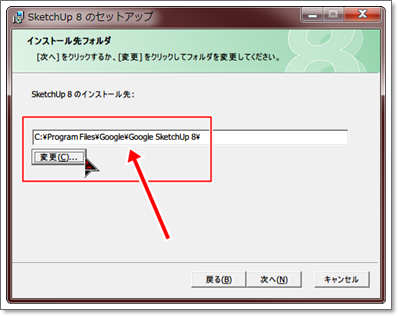
<img src="//samlen.blog.shinobi.jp/File/2014-5-19_11-2-28.png" alt="" /> <br />
● インストール先を変更すると、新しいバージョンと<span style="color: #ff0000;"><strong>V8</strong></span>は共存できます。<br />
<br />
<br />
-]]> 
    </content>
    <author>
            <name>H.kino</name>
        </author>
  </entry>
  <entry>
    <id>samlen.blog.shinobi.jp://entry/457</id>
    <link rel="alternate" type="text/html" href="http://samlen.blog.shinobi.jp/sketchup%E5%85%A5%E9%96%80/sketchup%E3%81%AE%E3%82%B8%E3%83%A3%E3%83%9E%E3%81%AA%E4%BA%BA%E7%89%A9%E3%82%92%E3%81%AA%E3%81%8F%E3%81%99" />
    <published>2014-05-14T20:50:51+09:00</published> 
    <updated>2014-05-14T20:50:51+09:00</updated> 
    <category term="SketchUP入門" label="SketchUP入門" />
    <title>SketchUPのジャマな人物をなくす</title>
    <content mode="escaped" type="text/html" xml:lang="utf-8"> 
      <![CDATA[<img src="//samlen.blog.shinobi.jp/File/skewoman.gif" alt="" /> <br />
<br />
（1）人物をマウスで右クリック<br />
（2）出てきたメニューの「<span style="color: #ff0000;"><strong>消去</strong></span>」<br />
終わり<br />
<br />
<br />
]]> 
    </content>
    <author>
            <name>H.kino</name>
        </author>
  </entry>
  <entry>
    <id>samlen.blog.shinobi.jp://entry/456</id>
    <link rel="alternate" type="text/html" href="http://samlen.blog.shinobi.jp/sketchup%E5%85%A5%E9%96%80/%E4%BB%8A%E3%81%AEsketchup%E3%81%AE%E6%9C%80%E6%96%B0%E3%83%90%E3%83%BC%E3%82%B8%E3%83%A7%E3%83%B3%E3%81%AFver.14." />
    <published>2014-05-13T06:44:40+09:00</published> 
    <updated>2014-05-13T06:44:40+09:00</updated> 
    <category term="SketchUP入門" label="SketchUP入門" />
    <title>今のSketchUPの最新バージョンはVer.14.0.4900　ずいぶんと操作画面変わりました。</title>
    <content mode="escaped" type="text/html" xml:lang="utf-8"> 
      <![CDATA[<img src="//samlen.blog.shinobi.jp/File/2014513-384.png" alt="" /> <br />
● 自分で楽しむ分にはいいですが、商用の利用はProを買わなければいけません。<br />
ダウンロード先：<br />
<a href="http://www.sketchup.com/ja/download" title="" target="_blank">http://www.sketchup.com/ja/download</a><br />
<br />
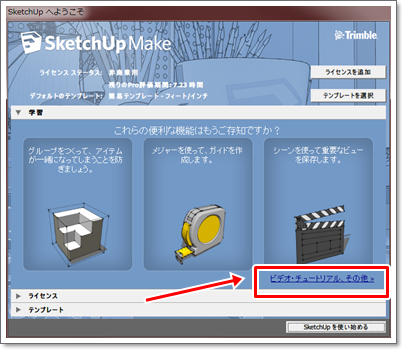
<img src="//samlen.blog.shinobi.jp/File/2014513-383.png" alt="" /> <br />
●　最初に現れる画面で、説明動画を見ることできます。 <br />
Video Tutorials | SketchUp<br />
<a href="http://www.sketchup.com/learn/videos" title="" target="_blank">http://www.sketchup.com/learn/videos</a><br />
<br />
<br />
<br />
・<br />
<br />
]]> 
    </content>
    <author>
            <name>H.kino</name>
        </author>
  </entry>
  <entry>
    <id>samlen.blog.shinobi.jp://entry/455</id>
    <link rel="alternate" type="text/html" href="http://samlen.blog.shinobi.jp/%E6%9C%AA%E9%81%B8%E6%8A%9E/%E7%A7%81%E3%81%AE%E5%91%A8%E3%82%8A%E3%81%AEpc%E5%88%9D%E5%BF%83%E8%80%85%E3%81%9F%E3%81%A1" />
    <published>2013-07-13T10:44:21+09:00</published> 
    <updated>2013-07-13T10:44:21+09:00</updated> 
    <category term="未選択" label="未選択" />
    <title>私の周りのPC初心者たち</title>
    <content mode="escaped" type="text/html" xml:lang="utf-8"> 
      <![CDATA[◯ Excel　セルの合計機能しか使わない<br />
◯ メールソフトはOutlookのみ<br />
◯ Googleでの検索　一つの言葉のみで検索<br />
◯ Notepadを知らない<br />
◯ 新しいソフトは、言われるままにOKをクリック<br />
◯ ハードディスクCのみ使う<br />
◯ マウスが壊れているのに、コンピュータが悪いという<br />
◯ メモリー、CPUなんのこと？？<br />
◯ ファイルの保存場所変えることができない<br />
◯ CTR+V、CTR+C　しらない<br />
◯ 取った画像、大きいまま送ってくる<br />
<br />
私も昔はそうでした。<br />
<br />
]]> 
    </content>
    <author>
            <name>H.kino</name>
        </author>
  </entry>
  <entry>
    <id>samlen.blog.shinobi.jp://entry/454</id>
    <link rel="alternate" type="text/html" href="http://samlen.blog.shinobi.jp/%E6%9C%AA%E9%81%B8%E6%8A%9E/%E4%B9%85%E3%80%85%E3%81%AB%E5%BF%8D%E8%80%85%E3%81%AB%E8%A7%A6%E3%82%8C%E3%82%8B" />
    <published>2013-02-03T17:33:08+09:00</published> 
    <updated>2013-02-03T17:33:08+09:00</updated> 
    <category term="未選択" label="未選択" />
    <title>久々に忍者に触れる</title>
    <content mode="escaped" type="text/html" xml:lang="utf-8"> 
      <![CDATA[ブログ気が向いた時に、触ってみたくなります。<br />
<br />
忍者はWLWが使えないので不便かも<br />
<br />
HTML、CSSの勉強でブログのデザインをいじりたいと思います。<br />
<br />
<br />
<br />
<br />
<br />
]]> 
    </content>
    <author>
            <name>H.kino</name>
        </author>
  </entry>
  <entry>
    <id>samlen.blog.shinobi.jp://entry/452</id>
    <link rel="alternate" type="text/html" href="http://samlen.blog.shinobi.jp/sketchup%E5%85%A5%E9%96%80/%E5%9B%9B%E8%A7%92%E5%BD%A2%E3%82%92%E6%8F%8F%E3%81%8F%E3%80%80%E3%80%80%EF%BC%88sketchup%EF%BC%89" />
    <published>2012-07-04T18:17:07+09:00</published> 
    <updated>2012-07-04T18:17:07+09:00</updated> 
    <category term="SketchUP入門" label="SketchUP入門" />
    <title>四角形を描く　　（SketchUp）</title>
    <content mode="escaped" type="text/html" xml:lang="utf-8"> 
      <![CDATA[<img alt="sikaku120704.gif" src="//samlen.blog.shinobi.jp/File/sikaku120704.gif" style="border-width: 0px; border-style: solid; width: 330px; height: 297px; vertical-align: middle;" /><br />
<br />
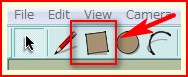
①　下図の赤枠、四角形のアイコンを選択します。<br />
<a href="//samlen.blog.shinobi.jp/File/Snap_2012-7-4_17-17-25.jpg" target="_blank"><img alt="Snap_2012-7-4_17-17-25.jpg" src="//samlen.blog.shinobi.jp/Img/1341393709/" style="border-width: 0px; border-style: solid; width: 188px; height: 77px; vertical-align: middle;" /></a><br />
<br />
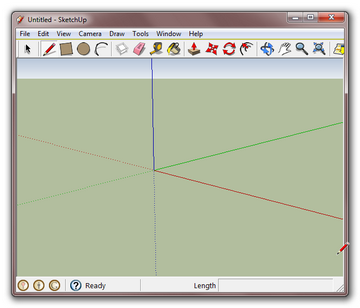
②　好きなところで、一回目の左クリック<br />
<br />
③　自由に動かし、二回目の左クリック<br />
<br />
■　これで、四角形を出来上がりです。<br />
<br />
<br />
<br />
<br />
<br />
<br />
]]> 
    </content>
    <author>
            <name>H.kino</name>
        </author>
  </entry>
  <entry>
    <id>samlen.blog.shinobi.jp://entry/450</id>
    <link rel="alternate" type="text/html" href="http://samlen.blog.shinobi.jp/sketchup%E5%85%A5%E9%96%80/capture%E3%82%BD%E3%83%95%E3%83%88%E3%80%80sketchup%E3%82%92%E3%82%AD%E3%83%A3%E3%83%97%E3%83%81%E3%83%A3%E3%83%BC-%E3%81%9D%E3%81%AE1" />
    <published>2012-05-11T18:09:35+09:00</published> 
    <updated>2012-05-11T18:09:35+09:00</updated> 
    <category term="SketchUP入門" label="SketchUP入門" />
    <title>Captureソフト　Sketchupをキャプチャー-その1</title>
    <content mode="escaped" type="text/html" xml:lang="utf-8"> 
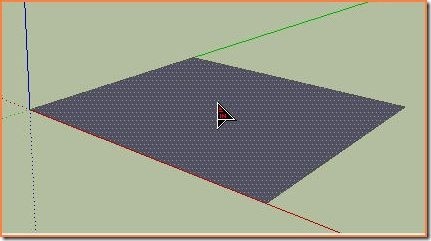
      <![CDATA[<p>■「Sketchup」をキャプチャーしようとしたら、マウスを取り込んでくれません。</p>
<p>マウスをキャプチャーするように設定しているのに</p>
<p>ソフト名：Kioku</p>
<p><a href="//samlen.blog.shinobi.jp/File/no-good.jpg" target="_blank"><img alt="no-good.jpg" src="//samlen.blog.shinobi.jp/Img/1336727696/" style="border-width: 0px; border-style: solid; width: 431px; height: 241px;" /></a></p>
<p>KIOKUの詳細情報 : Vector ソフトを探す！<br />
<a href="http://www.vector.co.jp/soft/winnt/art/se430226.html">http://www.vector.co.jp/soft/winnt/art/se430226.html</a></p>
<p>---------------------------</p>
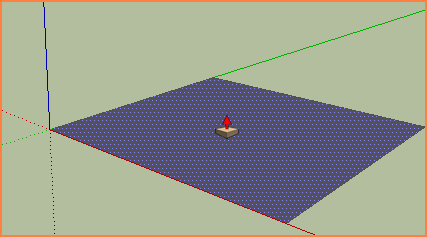
<p>ソフト名：SnapCrab</p>
<p><a href="//samlen.blog.shinobi.jp/File/ok-.png" target="_blank"><img alt="ok-.png" src="//samlen.blog.shinobi.jp/Img/1336727447/" style="border-width: 0px; border-style: solid; width: 427px; height: 237px;" /></a></p>
<p>SnapCrab for Windows - マウスひとつで、即キャプチャ。<br />
<a href="http://www.fenrir-inc.com/jp/snapcrab/">http://www.fenrir-inc.com/jp/snapcrab/</a></p>
<p>&nbsp;</p>
<p>◯下のソフトは、ちゃんとSketchupのマウスを正確にキャプチャーしています。</p>]]> 
    </content>
    <author>
            <name>H.kino</name>
        </author>
  </entry>
  <entry>
    <id>samlen.blog.shinobi.jp://entry/449</id>
    <link rel="alternate" type="text/html" href="http://samlen.blog.shinobi.jp/sketchup%E5%85%A5%E9%96%80/pc%E3%81%8Cwindows7%E3%81%AB%E3%81%AA%E3%81%A3%E3%81%9F%E3%81%AE%E3%81%A7%E6%96%B0%E3%81%97%E3%81%8Fsketchup%E5%85%A5%E3%82%8C%E3%81%AA%E3%81%8A%E3%81%99" />
    <published>2012-05-10T08:11:15+09:00</published> 
    <updated>2012-05-10T08:11:15+09:00</updated> 
    <category term="SketchUP入門" label="SketchUP入門" />
    <title>PCがWindows7になったので新しくSketchup入れなおす</title>
    <content mode="escaped" type="text/html" xml:lang="utf-8"> 
      <![CDATA[ついにXPの入ったPCが壊れ新しくWindows7英語版を現地で購入しました。<br />
そこで、ソフトも日本語でなく英語版に変更。<br />
<br />
別に、日本語版インストール出来ないわけでわありません。英語勉強のためソフト英語表示に変えているところです。<br />
<br />
Firefox,Chromeはすでに英語です。すぐに慣れてしまいます。<br />
<br />
<img src="//samlen.blog.shinobi.jp/File/english.png" alt="" />]]> 
    </content>
    <author>
            <name>H.kino</name>
        </author>
  </entry>
  <entry>
    <id>samlen.blog.shinobi.jp://entry/447</id>
    <link rel="alternate" type="text/html" href="http://samlen.blog.shinobi.jp/%E6%9C%AA%E9%81%B8%E6%8A%9E/%E4%B9%85%E3%81%97%E3%81%B6%E3%82%8A%E3%81%AB%E5%BF%8D%E8%80%85%E3%83%96%E3%83%AD%E3%82%B0%E8%A7%A6%E3%82%8A%E3%81%BE%E3%81%97%E3%81%9F" />
    <published>2012-05-01T12:27:29+09:00</published> 
    <updated>2012-05-01T12:27:29+09:00</updated> 
    <category term="未選択" label="未選択" />
    <title>久しぶりに忍者ブログ触りました</title>
    <content mode="escaped" type="text/html" xml:lang="utf-8"> 
      <![CDATA[ずっと放置していたので、いろいろなところがおかしくなっていました。<br />
忍者アドなくなっていたので、表示がおかしくなっていました。<br />
<br />
アドのスクリプト消そうにも、HTMLに出て来ません。日記のデータに紛れ込んでいるようで消せません。<br />
<br />
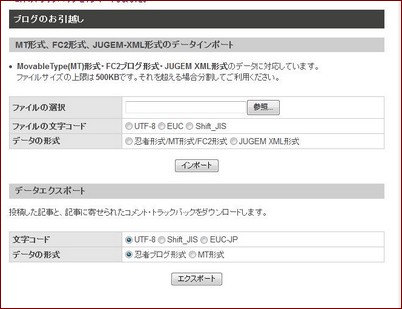
そこで、すべての記事をエクスポートし、記事を削除し新しくインポートする。<br />
これをやったところ、うまく行きました。<br />
<br />
<img src="//samlen.blog.shinobi.jp/File/move.jpg" alt="" /><br />
<br />
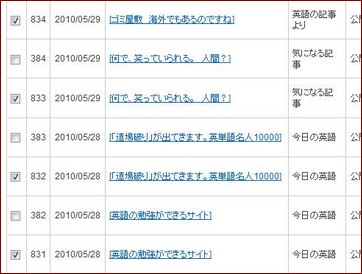
◯はじめ、記事をすべて削除せずに、インポートしたらすべての記事がダブりました<br />
<br />
<img src="//samlen.blog.shinobi.jp/File/bakabakasii.jpg" alt="" /><br />
<br />
<br />
<br />
<br />
<br />
<br />
]]> 
    </content>
    <author>
            <name>H.kino</name>
        </author>
  </entry>
</feed>